Focused local workflow
Consider Takeoff Field Tools.
It fits an owner-estimator who wants manual, reviewable measurement, built-in estimating, local Windows storage, clear exports, and a one-time license.
The best choice is not the product with the longest feature list. It is the product that carries your real job from plan or photo to measured scope, reviewable price, clear handoff, and useful setup for the next estimate—without making you pay for an operating model you do not need.
Construction takeoff and estimating software for Windows. $79 once. No subscription.
The short answer
These are workflow-fit summaries, not universal rankings. Each product can be the sensible choice for a different estimator.
Focused local workflow
It fits an owner-estimator who wants manual, reviewable measurement, built-in estimating, local Windows storage, clear exports, and a one-time license.
PDF depth and collaboration
It fits teams whose daily system is construction PDF markup, document control, revision comparison, Studio collaboration, and connected desktop, web, and mobile access.
Mature Windows automation
It fits estimators who value an established takeoff-and-estimating platform, AI-assisted tools, trade plugins, Excel workflows, and provider training.
Managed bid-team workflow
It fits higher-volume teams that benefit from AI assistance, repeating-area tools, drawing overlays, organization licensing, and related ConstructConnect workflows.
Cloud team platform
It fits teams that need browser access, shared projects, viewer seats, collaboration, cost data, integrations, and optional AI takeoff add-ons.
Current official facts
Price matters, but it does not establish feature equivalence. Compare the work each product replaces, the people who must use it, and the output that must survive review.
Local Windows takeoff and estimating for one named user on two PCs. All v1 updates are included.
Offer and license detailsFour annual plans span basic PDF measurement through advanced takeoff, automation, AI, Studio, web, and mobile capabilities.
Official Bluebeam pricingThe official checkout lists an annual subscription with support, software updates, and two hours of training.
Official PlanSwift checkoutConstructConnect says pricing varies by licensing option and business need, and offers a free 14-day trial.
Official product pagePremium and Pro prices are shown billed annually; optional takeoff and estimating add-ons can change total cost.
Official STACK pricingUS provider pages were checked July 27, 2026. Prices, discounts, features, add-ons, and terms can change. Follow each official source before purchasing. Takeoff Field Tools is not affiliated with or endorsed by Bluebeam, PlanSwift, ConstructConnect, On-Screen Takeoff, or STACK.
Actual Takeoff workflow
Takeoff Field Tools keeps a calibrated drawing, measured quantities, pricing logic, scope, bid versions, reports, and portable project packages in one Windows project. The source remains visible when the number is reviewed, and the useful setup can remain available when the next estimate begins.
Takeoff does not provide automatic AI takeoff, full PDF editing, drawing-overlay comparison, hosted realtime co-editing, enterprise administration, browser or mobile apps, or universal feature parity with the products above.
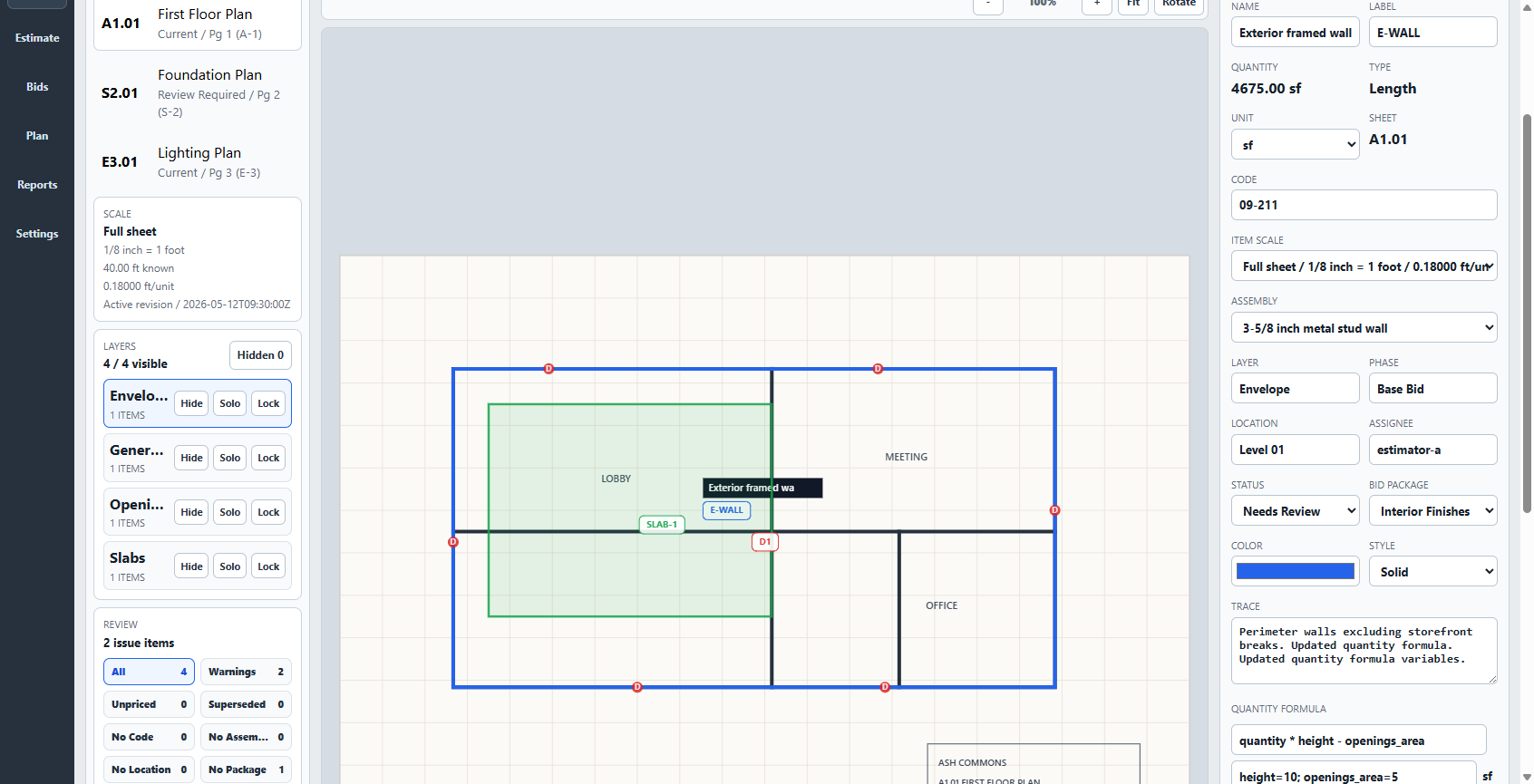
A fair product test
Feature grids hide handoff problems. Use the same drawing, quantity checks, assembly, and bid output in every product you evaluate.
Download five free synthetic practice-plan sets with 42 published quantity checks →
Where the $79 product fits
Every estimate should make the next one better. That promise is useful only when the product matches the way you actually work.
Takeoff may fit when
Choose another product when
Buying questions
Start with the smallest product that completes your actual plan-to-bid workflow. Takeoff Field Tools is designed for a Windows owner-estimator who wants local projects, reviewable manual measurements, built-in estimating, reusable setup, and a one-time license. If you need cloud teamwork, AI automation, PDF production, or enterprise controls, one of the larger products is likely a better fit.
No. A low price is poor value if the tool omits a capability you use on every bid. It can be excellent value when one estimator needs a focused workflow and would otherwise pay for collaboration, administration, or automation that goes unused.
Yes. Use the five free practice-plan sets to test scale, counts, lengths, areas, deductions, and review. Takeoff Field Tools also includes a 30-day money-back guarantee.
Yes, when the image contains a dependable dimension or another defensible calibration reference. A photograph only proves the surfaces and boundaries it actually shows, so combine views or use a floorplan when hidden or full-room scope matters. See the five-room photo workflow.
No. The founding v1 license is $79 once for one named user on up to two Windows PCs, with all v1 updates included. A future major version may be a separate optional purchase; the version you bought keeps working under its license.