One named user on two Windows PCs, with all v1 updates included.
Current Takeoff offer On-Screen Takeoff alternative · Windows
A focused alternative
for the owner-estimator.
Construction takeoff and estimating software for Windows. $79 once. No subscription. Takeoff Field Tools keeps measured quantities, pricing, scope, bid versions, and reusable estimating logic in one local project. Every estimate should make the next one better.
Not a drop-in On-Screen Takeoff replacement · One named user · Two Windows PCs · 30-day guarantee
$79 onceNo recurring seat fee
WindowsLocal project storage
Plan to estimateQuantity, price, and scope
ReusableKeep estimating knowledge
Current official facts
These products serve different operating scales.
ConstructConnect positions On-Screen Takeoff as a mature digital takeoff system with AI assistance, drawing comparison, repetitive-work tools, organization licensing, and workflows for larger bid teams. Takeoff Field Tools is a smaller local-first product for carrying manual, reviewable measurements into estimates and preserving the logic for later work.
ConstructConnect says pricing varies by licensing option and business need. Its product page offers a free 14-day trial.
Official product pageConstructConnect describes its current new-customer branch as subscription-based. Organization administrators invite users and assign licenses.
Official release notesTakeoff Boost, Auto Name, Multi-Condition Takeoff, Typical Areas, repeating pages, auto count, styles, templates, and drawing overlay support higher-volume workflows.
Official feature overviewThe current installer flow uses a ConstructConnect Platform account, with company-admin invitations and assigned takeoff licenses.
Official setup guideKeep the drawing, measured scope, estimating logic, saved bid, exports, and portable project package connected without adding a hosted collaboration system.
Watch the actual workflowProvider facts were checked July 27, 2026. Products, features, prices, discounts, licensing, and terms can change. Takeoff Field Tools is not affiliated with or endorsed by ConstructConnect. On-Screen Takeoff is a trademark of its owner.
See Takeoff before deciding
The marked plan and priced scope stay in the same project.
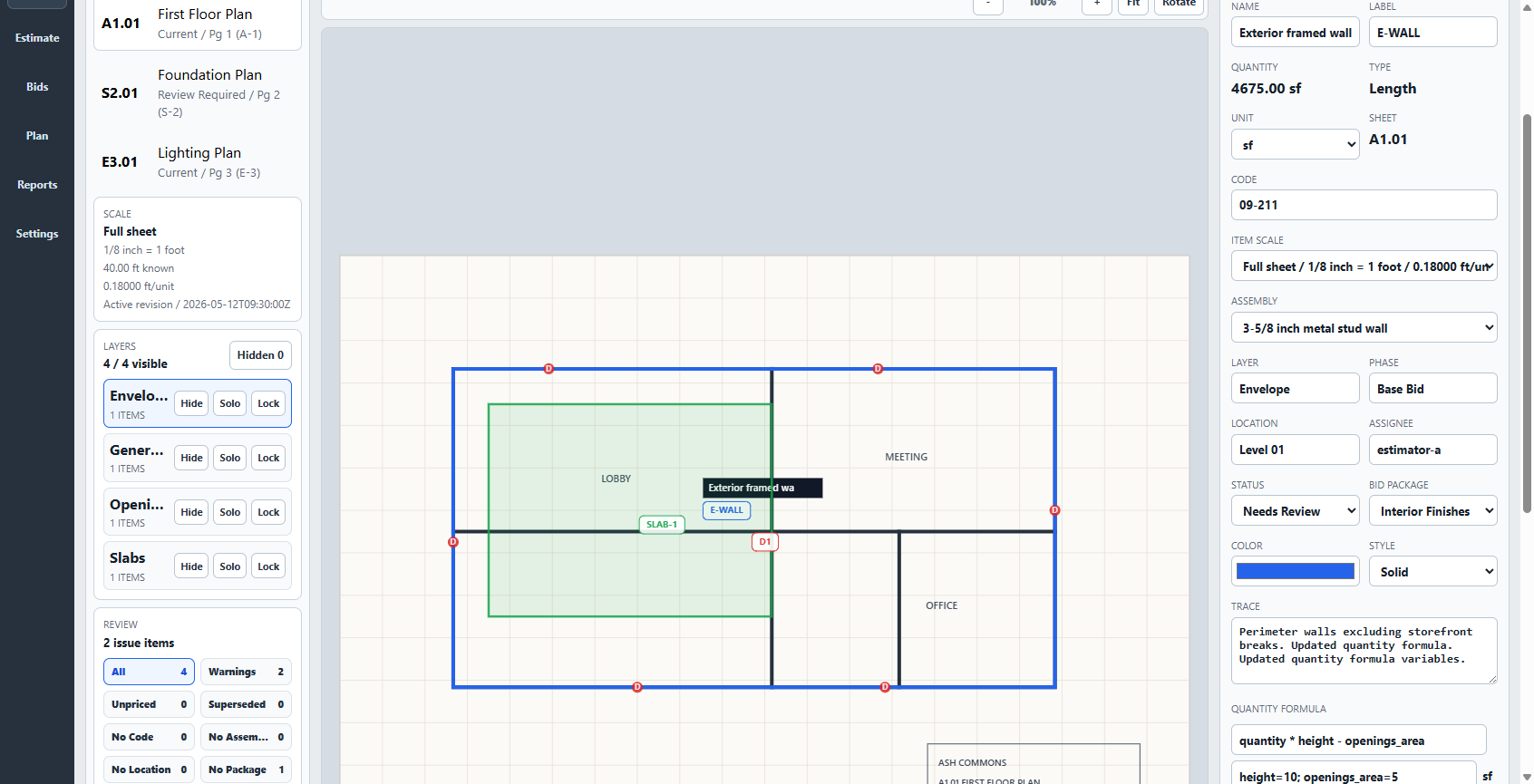
Takeoff keeps calibrated plan geometry, quantity items, pricing, project controls, and bid versions together. Review the estimate, export a clear handoff, package the project for another workstation, and keep proven assemblies and scope decisions ready for similar work.
- Measurements
- Count, length, area
- Pricing
- Items and assemblies
- Persistence
- Bid versions and backups
- Communication
- Reports and packages
Takeoff does not provide automatic AI takeoff, drawing-overlay revision comparison, hosted realtime co-editing, enterprise account administration, or On-Screen Takeoff feature parity.
Choose on workflow fit
When each product is the more sensible choice.
The right comparison is not simply cheap versus expensive. It is whether the product supports the bid volume, automation, collaboration, and estimating handoff you actually need.
Takeoff may fit when
You want a compact estimating system you can keep.
- One owner-estimator or small contractor works mainly from Windows.
- Manual, reviewable plan measurement is appropriate for the bid volume.
- You want quantities connected directly to pricing, scope, and customer-facing output.
- Local storage, offline core work, and a one-time license matter more than centralized administration.
On-Screen Takeoff may fit when
Automation and organizational scale earn their place.
- AI-assisted first passes or automatic counts save material estimator time.
- Drawing overlays, typical areas, repeating pages, and multi-condition takeoff match recurring work.
- A company administrator needs to invite users and assign licenses.
- Your process already depends on ConstructConnect, On-Screen Takeoff, or related estimating workflows.
Run a useful side-by-side test
Use the same small bid in both products.
Start with work your company understands. Measure first, then test what remains clear when another person reviews the estimate or when the next similar project arrives.
- Import the same PDF and verify scale against a labeled dimension.
- Measure one count, length, and area, including a deduction or scope boundary.
- Apply a representative assembly with waste, labor, and current supplier costs.
- Review the source, assumptions, estimate coverage, and customer-facing export.
- Reopen the project, check a revised drawing, and start a similar estimate from what was preserved.