Browser-based takeoff and proposal workflow with area, length, and count tools. The official page currently limits the free plan to one new takeoff file each month while keeping past projects accessible.
Official TakeCost plan details Honest 2026 comparison · Checked July 28
Looking for free construction takeoff software?
Start with what “free” actually includes.
Takeoff Field Tools is not free. It costs $79 once for Windows. Genuine free takeoff plans do exist, but their limits differ: new-project caps, browser storage, watermarked exports, one-user restrictions, or a trial that eventually ends. Compare the work you can actually complete before choosing.
No fake “free download” claim · No email gate on Takeoff’s free tools · No universal-cheapest claim
Free planOngoing with limits
Free trialExpires after a set period
Free toolOne bounded task
One-time product$79 Windows license
Current official offers
Two free plans, one free trial, and one honest paid option.
These products do not have identical capabilities or operating models. The point is to distinguish a lasting free plan from a trial, a worksheet, and a one-time desktop license.
Browser-based PDF and image measurement with linear, area, count, markup, PDF, and CSV tools. The official page currently lists 50 MB storage, one user, and a small export watermark.
Official Solid Takeoff plan detailsOnline blueprint measurement and estimating that works on Windows and Mac. The provider describes a time-limited trial rather than a permanent free plan.
Official Square Takeoff trial pageLocal Windows plan measurement, estimating, review, exports, project packages, and reusable setup. It is not free and does not require a recurring seat subscription.
Exact Takeoff price and licenseUS provider pages were checked July 28, 2026. Free-plan limits, trials, storage, watermarks, prices, and features can change. Verify the linked provider page before signing up or purchasing. Takeoff Field Tools is not affiliated with or endorsed by TakeCost, Solid Takeoff, or Square Takeoff.
Choose the constraint you can live with
Free can be the right answer. So can paying once.
A free plan is not automatically inadequate, and a paid product is not automatically better. Choose from the work, storage, output, access, and ownership model you actually need.
A free plan may fit when
Your current volume fits its published limits.
- One new takeoff per month is enough.
- Browser or cloud storage matches your workflow.
- A storage cap or watermarked export is acceptable.
- You are comfortable rechecking terms as the product changes.
A one-time Windows product may fit when
You want the project local and the workflow connected.
- You want plan measurement, estimating logic, scope, and outputs together.
- You want local project files and offline core work after activation.
- You want reviewed assemblies and costs available for later estimates.
- You prefer a $79 v1 license to a recurring seat fee.
Free Takeoff Field Tools resources
Use the free part without pretending it is full software.
These resources require no account or email. They are useful for bounded tasks and product evaluation; none is represented as a complete PDF takeoff application.
Quantity takeoff sheet
Record plan references, count, length, area, volume, waste, and assumptions; export CSV or print locally. You supply the dimensions.
Blueprint scale calculator
Calibrate from a labeled dimension and convert a measured image distance into drawing length or area. It does not read the plan for you.
Bid markup calculator
Separate direct cost, overhead, and profit while seeing the difference between markup and margin. It does not create the underlying scope.
Open five free practice-plan sets See the three focused tools →
The actual $79 Windows product
Measure the plan, price the scope, and preserve what worked.
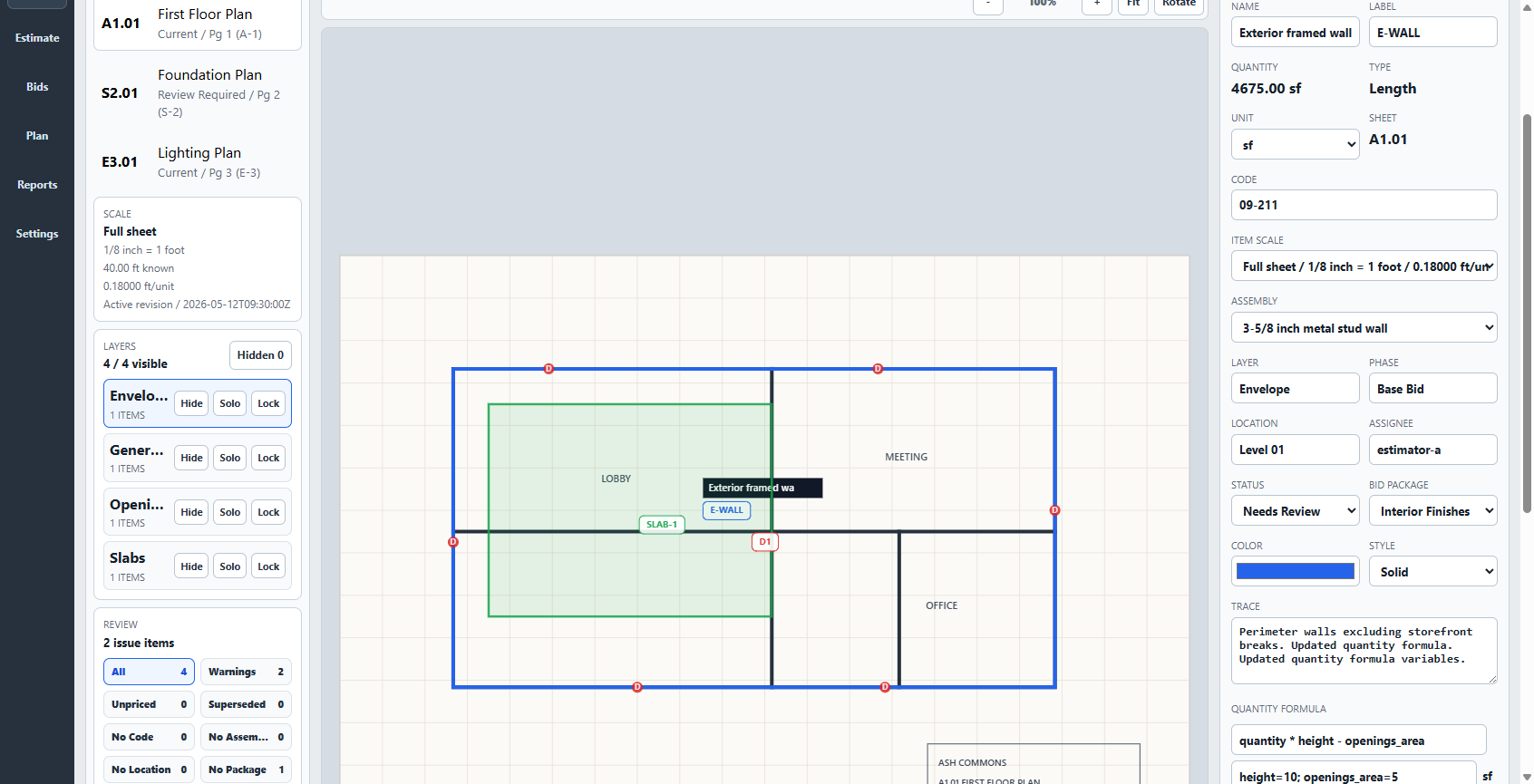
Takeoff Field Tools keeps calibrated drawings, measured quantities, visible estimating logic, review status, scope, outputs, and portable project packages in one local Windows project. The number stays connected to the reasoning another estimator needs to check and reuse.
- License
- $79 once
- Recurring seat fee
- $0
- Project files
- Local
- Named user
- Up to 2 PCs
Construction takeoff and estimating software for Windows. $79 once. No subscription. Every estimate should make the next one better.
Do not buy the wrong operating model
Takeoff is focused, not universally equivalent.
The one-time price is valuable only when the Windows workflow fits. A larger or cloud-first product is the better choice when its missing capability is part of your daily work.
Takeoff may fit when
One estimator wants an inspectable local workflow.
- Windows is your primary estimating desk.
- Manual, reviewable measurement fits your bid volume.
- You want pricing and scope beside the quantities.
- You want reusable setup without a recurring seat fee.
Choose another product when
The missing capability is mandatory.
- You require automatic AI takeoff or advanced overlays.
- Several people must co-edit the same hosted project in realtime.
- Mac, browser, or mobile product access is required.
- Enterprise administration or broad integrations justify a larger platform.
Straight answers
Free construction takeoff software questions
Is Takeoff Field Tools free?
No. Takeoff Field Tools is a Windows product sold for $79 once. It has no recurring seat fee. The separate browser tools and practice plans are free.
Does Takeoff Field Tools have a free trial?
No free trial is currently offered. You can watch the complete product demonstration, use the free tools and practice plans without an account, inspect the installation guide, and rely on the published 30-day refund policy after purchase.
Which free takeoff software can measure PDF plans?
TakeCost and Solid Takeoff currently publish free browser plans that include plan measurement. Their project, storage, export, user, and upgrade terms differ, so verify each provider’s current page before choosing.
What is the difference between a free plan, a free trial, and a free calculator?
A free plan remains available within published limits. A free trial expires. A calculator or worksheet performs a bounded task and is not a full plan-measurement product.
Does the free construction quantity sheet measure plans?
No. It calculates count, length, area, and volume from dimensions you already established. It does not import, calibrate, read, or measure a PDF or image.
Is the Takeoff Field Tools price really one time?
Yes. The current founding v1 license is $79 once for one named user on up to two Windows PCs, with all v1 updates included. A future major version may be an optional separate purchase.
Can Takeoff Field Tools work without an internet connection?
After installation and license activation, the core plan-measurement, estimating, review, export, backup, and project-package workflow uses local Windows project files and does not require a continuous internet connection.