One named user on up to two Windows PCs, with all v1 updates included and no recurring seat fee.
Current Takeoff offer Easy Takeoffs alternative · Honest 2026 comparison
Looking for an Easy Takeoffs alternative?
Choose the operating model first.
Construction takeoff and estimating software for Windows. $79 once. No subscription. Takeoff Field Tools is the local desktop option for an owner-estimator who wants measured scope, pricing logic, estimate output, and reusable estimating knowledge in one project.
Not a browser, Mac, iPad, cloud-sharing, or automatic-scale replacement · 30-day guarantee
$79 onceNo recurring seat fee
WindowsLocal project storage
Offline coreWork after installation
ReusableKeep estimating knowledge
Current official facts
Browser takeoff subscription or local Windows estimator?
Both products measure plans, but their strongest use cases are different. Easy Takeoffs publishes a cross-device browser workflow with cloud storage and sharing. Takeoff Field Tools keeps the source, quantity, priced estimate, output, and reusable setup together on one Windows PC.
The official terms list a monthly subscription after the trial. Applicable tax is additional.
Official Easy Takeoffs termsThe official terms list annual billing at the equivalent of $33.25 per month.
Official Easy Takeoffs termsIts product page publishes Mac, Windows, Linux, ChromeOS, and iPad access, unlimited cloud storage, and read-only project links.
Official Easy Takeoffs product pageEasy Takeoffs publishes automatic scale detection, AI page naming, revision comparison, annotated PDF and CSV export, and cross-device access.
Official Easy Takeoffs featuresKeep the marked source, quantity, item or assembly, formula, cost, scope, bid version, and reusable setup together.
Watch the Takeoff workflowEasy Takeoffs' official terms also publish a 14-day trial with no credit card required. Provider facts and US prices were checked July 29, 2026. Products, features, prices, discounts, trials, taxes, and terms can change; verify the current provider pages before purchasing.
Takeoff Field Tools is not affiliated with or endorsed by Easy Takeoffs. Easy Takeoffs is a trademark of its owner. This comparison does not claim feature parity or reproduce a competing interface.
See the actual Takeoff product
The source, quantity, price, and handoff stay connected.
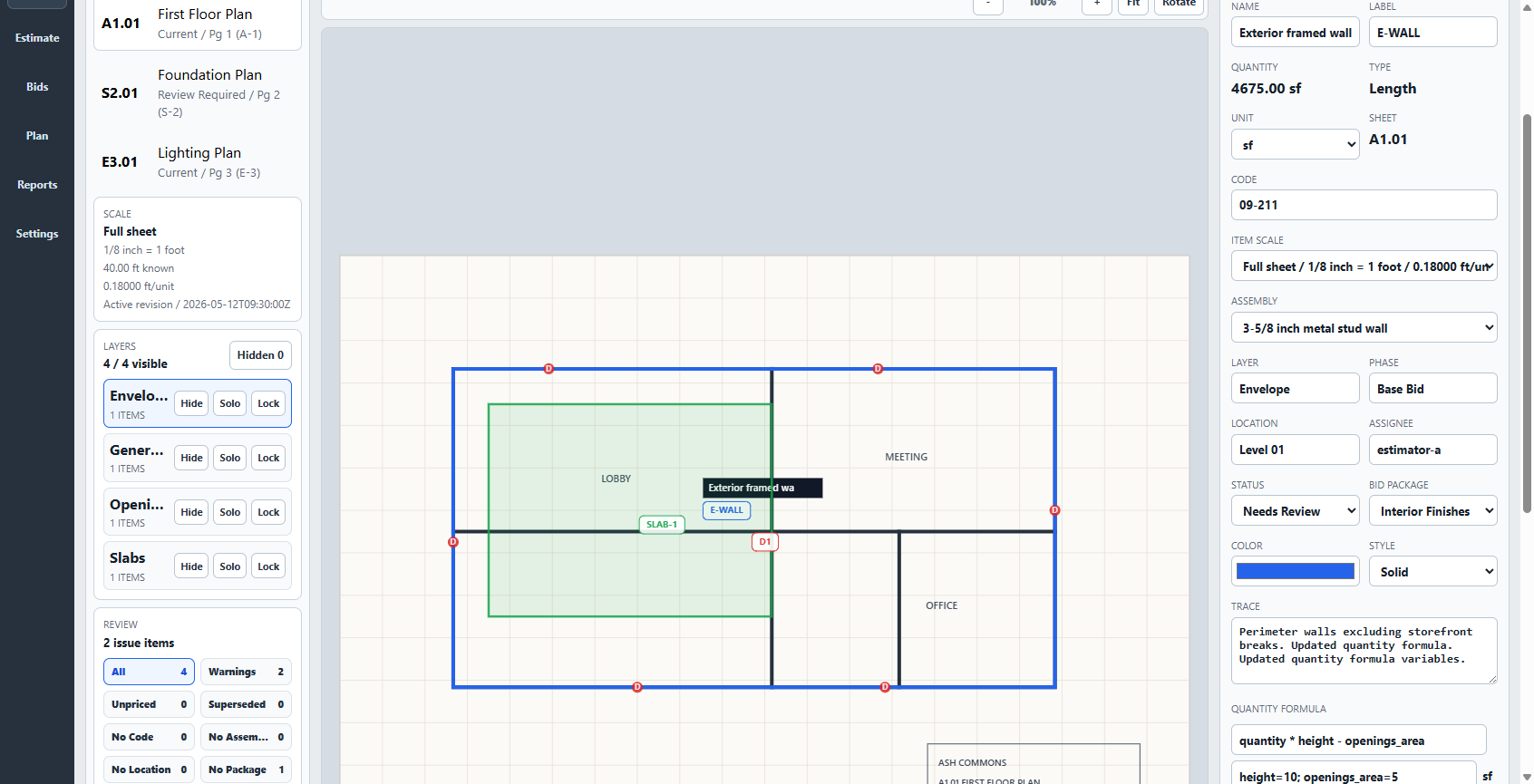
Import a PDF or image, calibrate it from a dependable dimension, mark counts, lengths, areas, or volumes, and carry the quantities into priced items or assemblies. Review formulas, costs, waste, markup, notes, and scope before producing an estimate another person can understand. Keep the useful setup for the next project.
- Measure
- Count, length, area, volume
- Price
- Items, assemblies, formulas
- Communicate
- Proposals, reports, workbooks
- Preserve
- Versions and reusable setup
Takeoff Field Tools does not provide automatic scale detection, AI page naming, plan-revision comparison, browser or mobile apps, cloud project storage, hosted realtime co-editing, automatic AI/OCR takeoff, or general job-management software. The current installer is Authenticode-signed.
Choose by the work you need
When each product is the more sensible choice.
The lower price does not replace browser access, cloud sharing, or automation you actually use. A recurring browser service is difficult to justify when one Windows estimator needs a durable local plan-to-estimate workflow.
Takeoff may fit when
One estimator needs the complete local bid.
- You work primarily from a Windows PC and prefer local project files.
- You want manual, reviewable quantities tied to visible pricing assumptions.
- You need priced items, assemblies, bid versions, and customer-facing outputs in the same project.
- You want offline core work and a one-time license.
Easy Takeoffs may fit when
Access and browser convenience matter more.
- Mac, iPad, Linux, ChromeOS, or browser access is required.
- Cloud storage and read-only sharing belong in the normal workflow.
- Automatic scale detection, AI page naming, or revision comparison saves meaningful time.
- A recurring subscription fits the way the product is used.
A fair side-by-side test
Run one representative bid through both products.
Do not compare price cards alone. Use the same plan and inspect the complete path from source measurement to a bid you can explain and reuse.
- Import the same PDF and verify its scale against a reliable labeled dimension.
- Measure one count, one length, one area, and one deduction.
- Apply a material formula and price the scope with current labor, waste, overhead, and profit assumptions.
- Review the marked source, quantity traceability, estimate coverage, and customer-facing export.
- Reopen the project and begin similar scope from the useful setup you retained.
Buying questions
What to know before choosing Takeoff.
Is Takeoff Field Tools a complete replacement for Easy Takeoffs?
No. Takeoff Field Tools is a local Windows takeoff and estimating application. Easy Takeoffs publishes browser, Mac, iPad, cloud-storage, share-link, automatic scale-detection, automatic page-naming, and revision-comparison capabilities that Takeoff Field Tools does not claim.
How does Easy Takeoffs pricing compare with Takeoff Field Tools?
Easy Takeoffs' official terms listed Pro at $39 per month or $399 per year when checked July 29, 2026, with a 14-day trial. Takeoff Field Tools costs $79 once for one named user on up to two Windows PCs, includes all v1 updates, and has no recurring seat fee.
Does Takeoff Field Tools work on Mac, iPad, or in a browser?
No. Takeoff Field Tools is a Windows desktop application. Choose a browser-based product such as Easy Takeoffs when Mac, iPad, or browser access is required.
Does Takeoff Field Tools store projects in the cloud?
No. Takeoff Field Tools stores projects locally and keeps its core measurement, estimating, review, export, backup, and project-package workflow available offline after installation. It does not provide hosted realtime co-editing or cloud project storage.
Does Easy Takeoffs publish capabilities that Takeoff Field Tools does not have?
Yes. Its current product page publishes automatic scale detection, AI page naming, plan-revision comparison, browser and iPad access, unlimited cloud storage, and read-only project links. Choose those capabilities when they are part of your real workflow.
Can I compare the products before buying?
Yes. Run the same representative plan through each product. Takeoff Field Tools provides five free synthetic practice-plan sets with 42 published checks, a public product demonstration, and a 30-day money-back guarantee.
Is the Takeoff Field Tools installer code-signed?
Yes. The current setup executable and application are Authenticode-signed, so Windows can verify the publisher before installation. Compare the delivered ZIP with the published SHA-256 before setup. The verification guide shows the exact process.