Measure the work
Import a PDF or image, confirm the current sheet and scale, then capture counts, lengths, areas, perimeters, and volumes with their source visible.
Construction takeoff and estimating software for Windows. $79 once. No subscription. Measure the work, turn scope into material quantities with visible formulas, communicate the estimate clearly, and preserve what survived review. Every estimate should make the next one better.
Manual, reviewable measurement · Local Windows projects · 30-day money-back guarantee
Drawing to material quantity
A material takeoff begins with measured work: how many devices, how many feet of wall, how much floor area, or how much concrete volume. Material logic then converts that scope into sheets, pieces, gallons, bags, cubic yards, or another purchasing unit. Takeoff keeps the source quantity and the conversion visible in the same project.
Import a PDF or image, confirm the current sheet and scale, then capture counts, lengths, areas, perimeters, and volumes with their source visible.
Connect measured scope to formulas and assemblies with explicit units, coverage, layers, waste, packaging, labor, costs, and markup.
Trace estimate lines back to the marked plan, test changed assumptions, save the reviewed bid, and export a proposal, report, workbook, or project package.
Watch the actual product workflow Start with the free quantity sheet → Compare takeoff software with a spreadsheet →
Actual product + controlled teaching plan
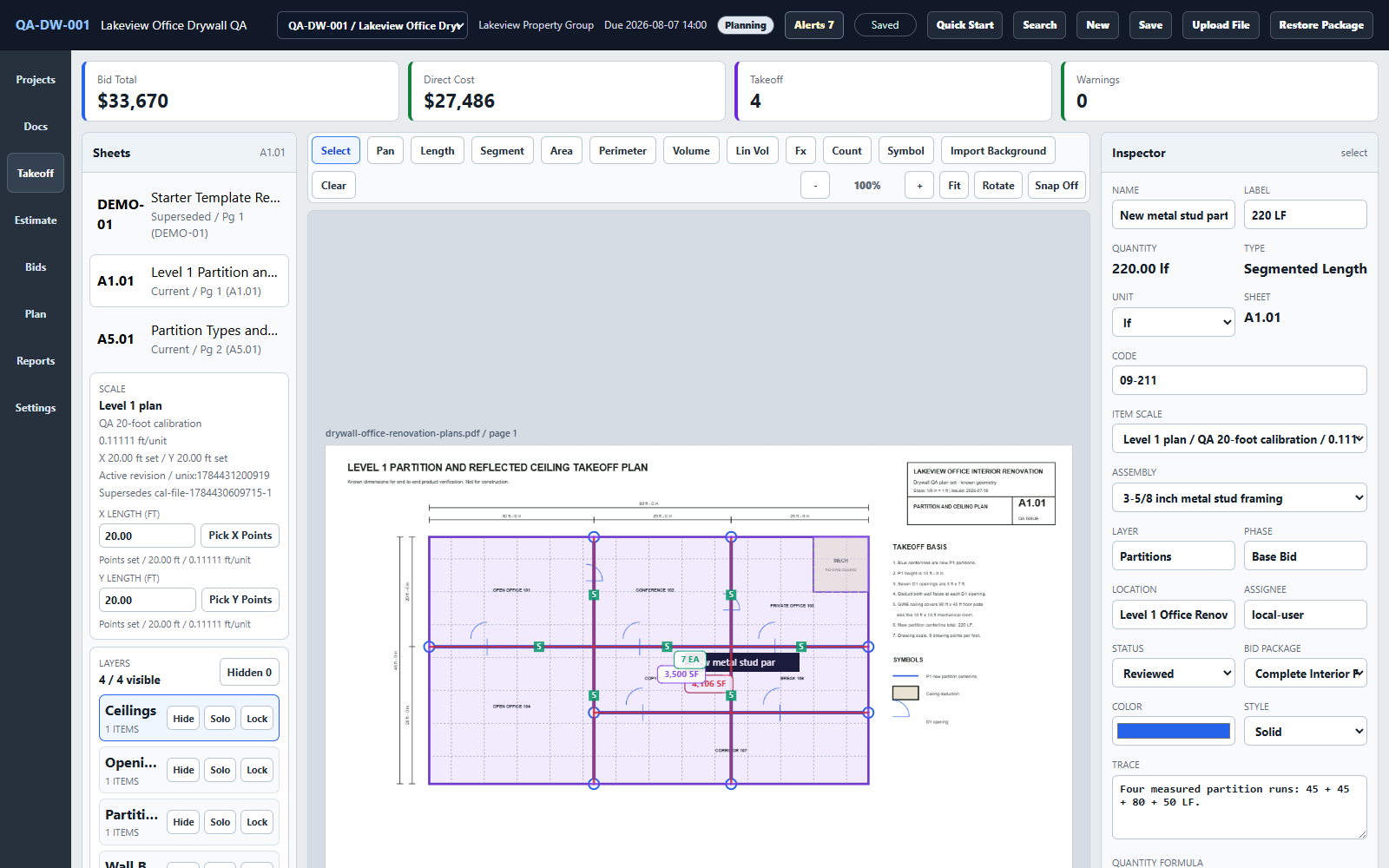
The published drywall example keeps wall and ceiling measurements separate. With 10% waste and 48 square feet per sheet, 4,106 SF of walls becomes 95 sheets and 3,500 SF of ceiling becomes 81 sheets. Separate rounding produces 176 sheets; pooling the areas before rounding produces 175.
The one-sheet difference is not the lesson. The lesson is that wall and ceiling may use different board, waste, installation, or purchasing rules, so the grouping and rounding decision should remain visible.
The screenshot shows the real Takeoff Windows application with an owned synthetic practice plan and sample test prices. Quantities and prices are teaching data, not a customer result, current supplier quote, material order, or recommended bid.
Inspect the complete plan-to-bid case Watch waste and rounding in the real app →
Choose the operating model, not the label
The product is designed for a Windows estimator who wants to measure and price the work deliberately. It does not automate away the checks that drawings, specifications, suppliers, and field conditions still require.
Takeoff fits when
Choose another product when
Always verify elsewhere: current drawings and addenda, specifications, hidden conditions, product selection, coverage, layout, code, supplier packaging, price, availability, lead time, and professional or trade requirements.
Evaluate without a sales call
The complete product demo shows PDF import, calibration, measurements, estimate handoff, review, export, and project reuse.
Download five synthetic construction plan sets with answer sheets and 42 checks. No email address or sales conversation is required.
Record source, location, count, dimensions, formulas, waste, assumptions, and separate unit totals in the browser, then export CSV or print.
Material takeoff software questions
Material takeoff software helps an estimator measure counts, lengths, areas, or volumes from project evidence and convert that scope into reviewable material quantities. The estimator still verifies drawings, specifications, formulas, waste, packaging, and field conditions.
No. A material takeoff establishes quantities. A cost estimate applies material prices plus labor, equipment, subcontract, tax, overhead, profit, risk, and other project assumptions. Takeoff Field Tools keeps the two connected.
Yes. Measured counts, lengths, areas, perimeters, and volumes can feed visible formulas and assemblies for materials, waste, coverage, packaging, labor, and pricing. The estimator reviews the formula and its inputs rather than accepting a hidden result.
No. Takeoff provides manual, reviewable measurement and estimating tools. It does not promise automatic AI quantities, OCR-based scope detection, or a material list that no one needs to check.
No. Takeoff does not provide live supplier prices, inventory, quote requests, purchase orders, delivery tracking, or cut-layout optimization. Current supplier and packaging information must be verified separately.
Core plan measurement, estimating, review, export, backup, and project-package work remains available after installation, and project files stay on the Windows PC. Purchase, download, activation, updates, and support use the internet.
Watch the actual product demonstration, inspect the complete drywall plan-to-bid example, or use the free practice plans and construction quantity sheet. None requires an email gate or sales conversation.