Flexible math
Build custom formulas, what-if models, summaries, and job-specific logic without waiting for a product feature.
Keep the spreadsheet when it is the right tool. Move when the handoff starts losing plan context, visible assumptions, and reviewed estimating knowledge. Construction takeoff and estimating software for Windows. $79 once. No subscription. Every estimate should make the next one better.
Written by the Takeoff Field Tools product team · Not an independent review · Checked July 28, 2026
This is not spreadsheet bashing
Excel remains strong when the work is primarily formulas, tables, custom templates, open-ended analysis, or a workbook that compatible Microsoft 365 users need to edit together. A flexible spreadsheet may be all a small contractor needs for straightforward jobs with disciplined source notes and a stable estimating process.
Build custom formulas, what-if models, summaries, and job-specific logic without waiting for a product feature.
Tables make estimating rows easier to sort, filter, calculate, and extend when the workbook is maintained carefully.
Microsoft documents realtime coauthoring when supported Excel versions, storage, file formats, accounts, and permissions are in place.
Official Microsoft support pages were checked July 28, 2026. Product capabilities and requirements can change. Takeoff Field Tools is not affiliated with or endorsed by Microsoft.
Choose by handoff risk
The better question is whether the saved system lets you trace the number, explain the scope, revise it safely, communicate it clearly, and reuse the parts that survived review.
Takeoff keeps calibrated counts, lengths, areas, perimeters, and volumes visibly attached to the PDF or image. A spreadsheet normally receives those quantities after measurement.
Excel is the more flexible tool for arbitrary formulas, macros, financial models, pivots, and analysis that reaches beyond the estimating workflow.
Takeoff keeps markup, sheet, scale, location, notes, quantity formula, assembly, and estimate context inside the same project.
Compatible Microsoft 365 workbooks can support simultaneous editing. Takeoff is a local, single-user Windows application.
Takeoff can preserve assemblies, costs, formulas, scope structure, bid versions, and project packages as a reviewed starting point for similar work.
Takeoff is a perpetual v1 license for one named user on two Windows PCs, including v1 updates. There is no recurring subscription.
Read the exact license and offerA cell can be correct and still be hard to audit if its drawing source, revision, scope boundary, formula assumption, and reviewer note live somewhere else. The practical threshold is the cost of that lost context, not the size of the spreadsheet.
Actual Takeoff Windows interface
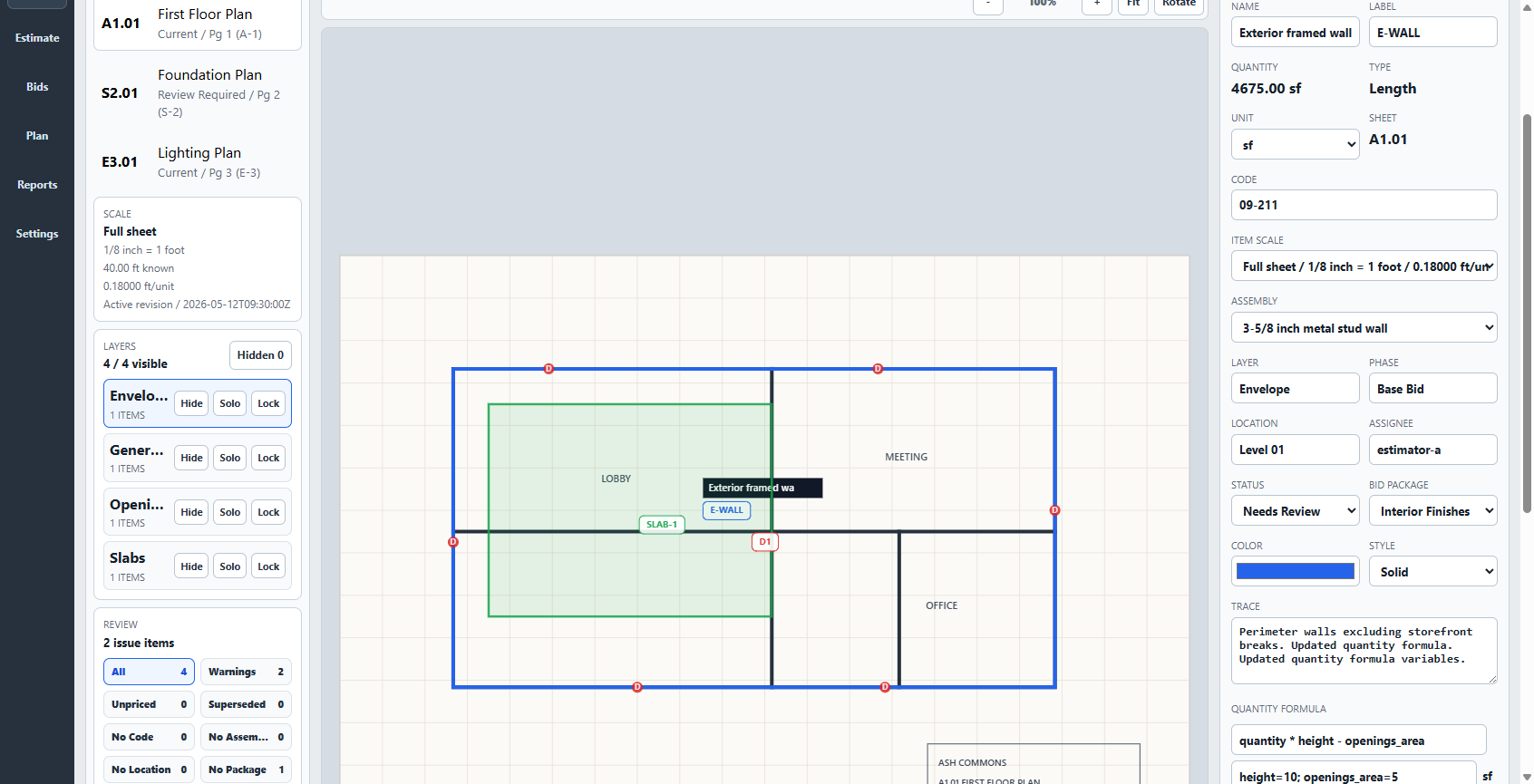
This current product screen keeps the calibrated plan, selected markup, quantity, unit, source sheet, scale, assembly, location, status, trace note, and visible quantity formula together. The estimate does not have to remember what the plan already knew.
The screenshot shows the actual Takeoff application with owned synthetic test data. Takeoff provides manual, reviewable measurement; it does not promise automatic AI or OCR quantities, a correct bid without estimator review, or a universal replacement for Excel.
Watch the complete product workflow See plan-to-estimate persistence →
Run a fair comparison
Do not decide from a feature list. Use the same drawing, scope, prices, assumptions, and required output. Then return after a few days and see which saved system still explains the estimate.
The free construction quantity sheet records source, location, dimensions, formulas, waste, assumptions, and separate unit totals. Export CSV or print without an account.
Download five synthetic plan sets with reference sheets and 42 published quantity checks. No email address or sales call is required.
Watch PDF import, calibration, plan measurement, estimate handoff, review, export, and project reuse in the current Windows interface.
Keep both when both earn their place
Some contractors will measure and build the estimate in Takeoff, then use an exported workbook for an additional owner, accounting, or analysis workflow. The boundary should follow the work, not a software slogan.
Takeoff may fit when
Keep Excel or choose another product when
Spreadsheet vs estimating software questions
Not for every job. Excel is excellent for flexible formulas, tables, templates, open-ended analysis, and compatible cloud coauthoring. Dedicated takeoff software earns its place when measured plan geometry, source context, estimating logic, review notes, and reusable project knowledge need to stay connected.
Yes. A well-built spreadsheet can calculate quantities, unit costs, labor, waste, overhead, profit, and bid totals. The estimator still needs a reliable way to preserve where each quantity came from, which drawing revision applies, what scope was included, and which assumptions were reviewed.
Consider dedicated software when quantities are repeatedly retyped, plan markups and estimate cells drift apart, revisions are hard to trace, reviewed assemblies or costs are rebuilt from memory, or another person cannot explain the estimate from the saved project.
No. Takeoff is a focused plan-measurement and construction-estimating application. It does not replace spreadsheet macros, arbitrary financial models, general data analysis, or realtime workbook coauthoring. You can keep using spreadsheets where they remain the right tool.
No. Takeoff is a local, single-user Windows workflow and is not a hosted realtime coauthoring platform. Choose Microsoft 365 or another cloud product when simultaneous editing is a requirement.
Core plan measurement, estimating, review, export, backup, and project-package work remains available after installation, and project files stay on the Windows PC. Purchase, download, activation, updates, and support use the internet.
Use the free construction quantity sheet, download a practice plan, and run the same representative scope through both workflows. Compare calibration, quantity traceability, estimate review, export quality, reopening the project, and starting the next similar estimate.