Trace the source
Import a PDF or image, calibrate from a reliable known distance, and keep each count, length, area, perimeter, and volume connected to the source that supports it.
Construction takeoff and estimating software for Windows. $79 once. No subscription. Rehab estimating software for real estate investors who need the construction scope behind the number: turn listing dimensions, plans, and tenant or inspector photos into measured quantities, explicit allowances, and a field-verification list before the cost reaches your flip, BRRRR, or rental return model.
30-day money-back guarantee · One named user · Two Windows PCs · Works offline after installation
Construction scope before financial output
A deal calculator can apply the formula perfectly. It cannot tell you whether the flooring area, wall surface, roof geometry, opening count, or wet-room scope behind the rehab input was measured, assumed, or omitted.
Import a PDF or image, calibrate from a reliable known distance, and keep each count, length, area, perimeter, and volume connected to the source that supports it.
Organize measured work, allowances, exclusions, and inspection questions separately. Unknown scope stays visible instead of quietly becoming zero.
Carry quantities into labor, material, equipment, and subcontract cost items, then save the estimate you discuss with a partner, lender, contractor, or buyer.
Takeoff does not provide comps, ARV, rent, financing, insurance, title, inspection, permit, legal, or tax conclusions. It makes the measurable construction input easier to inspect and communicate. If listing photographs arrive before a complete plan, the five-room photo takeoff workflow shows what a dependable reference can support and what should remain open.
Listing-photo rehab screening
Photos are useful early because they can expose visible condition and help quantify some of the work before a walkthrough. The safe workflow separates what the image shows from what the image merely suggests.
Tag the room, surface, damage, finish, opening, fixture, and other visible conditions. A stain can justify an inspection question; it does not prove the concealed repair.
Use published room dimensions, a plan, or a known object lying on the same surface. In Takeoff, set horizontal and vertical scale separately and trace only the visible work.
Put hidden work, missing views, uncertain quantities, and local-price checks on a field-verification list. Replace allowances as better evidence and quotes arrive.
Copy this photo request
“Please send one wide photo so I can see the room, then one straight-on photo of each damaged surface. Put a U.S. quarter flat beside the damage—not closer to the camera—and keep the whole damaged edge in frame. If you use another object, tell me its exact measured width and height. Label the room and wall.”
Copies a plain-text request. No recipient, message, or photo is sent to Takeoff.
Why the quarter works
The coin and damage must lie on the same plane, and the camera should be reasonably square to that surface. Calibrate both directions. If horizontal and vertical scale disagree sharply, ask for a better photo. Do not assume the size of a lighter, key, or phone.
Photo-derived quantities still need field verification before final pricing, contracting, or investment decisions.
Five-minute product workflow
The listing looked tempting on a calculator. The room schedule told us where to slow down. This case follows the source into the real Takeoff app, keeps the gap visible, and shows why a neat return formula cannot rescue an incomplete scope.
Independent analysis of a dated public listing snapshot. The room rectangles are our schedule reconstruction, not the property's floor plan. Rehab and return values are educational scenarios, not a bid, appraisal, forecast, or investment recommendation.
Construction takeoff and estimating software for Windows. $79 once. No subscription.
Save the reviewed scope, allowances, and decisions for the next project. Every estimate should make the next one better.
Real Zillow listing · Source snapshot July 26, 2026
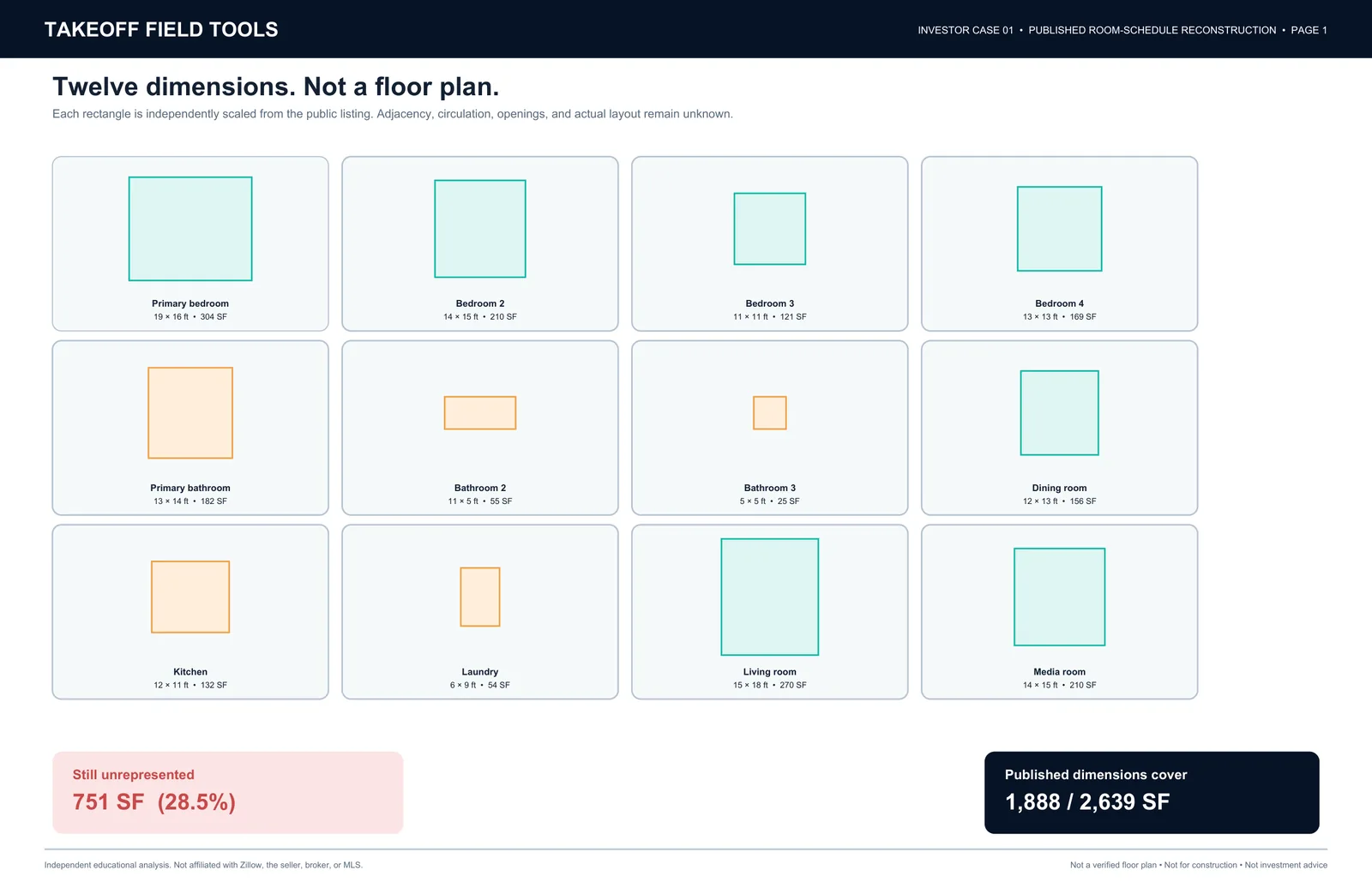
At the July 26 snapshot, a Port Charlotte fixer was listed at $280,000 with 2,639 SF of living area. We transcribed its twelve published room dimensions into an original room-schedule reconstruction and measured the source before testing any rehab or return scenario.
The 751 SF is not “missing from the house.” It is living area that the published room schedule does not describe. It may include circulation, closets, open areas, or other spaces, and it remains unpriced from this source alone. Review the source listing.
No email gate. Original reconstruction for education and takeoff practice; not for construction.
Why the scope changes the deal
In one educational flip screen using the $280,000 asking price, 8% selling costs, and a $20,000 holding and closing allowance, a $450,000 ARV scenario moves from $64,000 profit to $14,000 and then negative $36,000 as the rehab input changes from $50,000 to $100,000 and $150,000.
Those are scenario inputs, not a bid, appraisal, comp analysis, or investment recommendation. The point is the sensitivity: return math cannot repair a weak construction assumption downstream.
Before a photo-derived scope reaches the deal model
No. Listing photos can help screen visible condition, count visible items, and measure supported same-plane work when a reliable dimension is present. They cannot prove concealed damage, code requirements, room depth, surfaces outside the camera view, or current local pricing. Keep those items as allowances or field-verification questions until better evidence arrives.
Ask for one wide context photo and one reasonably square, straight-on photo of each damaged surface. Put a U.S. quarter or another exactly measured object flat on the same surface as the damage, keep the entire damaged edge in frame, and label the room and wall. A U.S. quarter is 0.955 inch in diameter.
No. You set the horizontal and vertical scale from a dependable reference, then trace only the visible work the photograph supports. The source image, measurement, assumption, and review note remain together so a person can check the result.
Keep unknown work visible as a field-verification item, explicit allowance, or exclusion instead of silently treating it as zero. Update the saved project when inspection evidence, plans, or contractor quotes arrive.
No. Takeoff organizes the measurable construction scope and estimate that feeds a separate deal model. It does not provide comps, ARV, rent, financing, inspection, legal, permit, insurance, or tax conclusions.
Takeoff v1 costs $79 once for one named user on up to two Windows PCs and includes all v1 updates. There is no recurring seat fee. The current installer is Authenticode-signed and the purchase includes a 30-day money-back guarantee.